What Does an EPOS System Actually Cost?
And Why the Price Tag Tells You Almost Nothing.
Executive Summary
When most operators start evaluating EPOS systems, they lead with one question: how much does it cost? It is a reasonable question. It is also, in most cases, the wrong one. The number on the quote tells you almost nothing about what the system will actually cost your business to run - or how much it will generate.
The real cost of an EPOS system is the sum of six things:
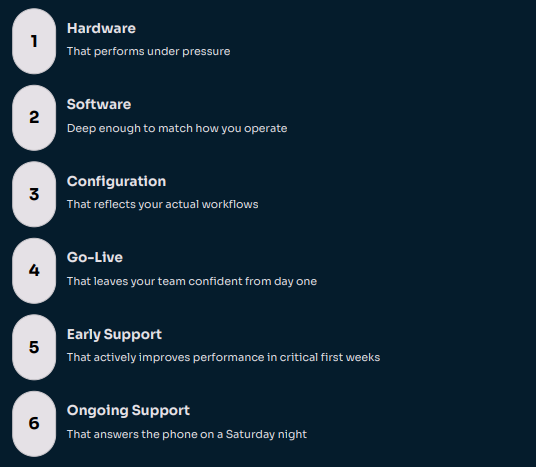
This guide breaks down each of them - so you can make a decision based on value, not just price.
Most operators, when they start looking at EPOS systems, ask the same question: "How much does it cost?" It is a reasonable question. But it is also, in most cases, the wrong one to lead with.
Because the price of an EPOS system - the number on the quote - is one of the least useful ways to evaluate whether it will actually be good for your business.
The real cost of an EPOS system is not the price you pay for it. It is the price you pay when it does not work the way your business needs it to.
This guide breaks down every factor that affects what you pay - and more importantly, what you actually get. So you can make a decision based on value, not just price.
PART 01 Hardware - What You Are Actually Buying
Hardware is the part of an EPOS system you can see, touch, and drop. Terminals, screens, receipt printers, cash drawers, card payment devices, kitchen display screens, handheld ordering devices, kiosk units. The list varies depending on the type of business you run and how you want it to operate.
ENTRY-LEVEL HARDWARE Attractive on the quote. Expensive in practice. Tablet-based systems. Consumer-grade screens. Equipment that looks the part but was not designed for the demands of a busy kitchen pass or a high-volume bar. This hardware tends to fail at the worst possible moment. | COMMERCIAL-GRADE HARDWARE Costs more to buy. Considerably less to own. Purpose-built, designed for heat, liquid, the accidental knock, and the constant fast hands of a trained team. It lasts longer, performs better, and its true cost over three years is typically lower than the entry-level alternative. |
To understand what the hardware gap actually means in practice, consider what happened to one of our customers before they switched to Truli. They were running a tablet-based system - good enough on a quiet Tuesday. On a bank holiday Saturday, with 200 covers on the books and a full bar running alongside, the primary terminal overheated and went down at 7pm. The card reader stopped pairing. The kitchen display went with it. Staff reverted to paper for the rest of service. They lost track of three covers entirely. Two tables left without ordering dessert or a second round of drinks. The repair call cost £180. The lost revenue that evening was estimated at over £600. The one-star review posted the following morning mentioned nothing about the food.

THE TRUE COST OF CHEAP HARDWARE
A failed terminal on a Saturday night does not just cost you the repair bill.
It costs you the covers you could not turn, the card payments you could not take, the queue that built up while staff scrambled, and the reviews your customers wrote on Sunday morning.
What to Ask About Hardware
Is this equipment designed specifically for hospitality and retail environments, or is it repurposed consumer technology?
What is the failure and replacement rate in real-world deployments?
Who owns the hardware relationship - the provider or a third party - and who do you call when something breaks?
Is the hardware locked to the software provider, or is it an open ecosystem?
What happens to your hardware investment if you outgrow the software?
Hardware is the foundation. Get it wrong and everything built on top of it is unstable.
PART 02 Software - The Engine Under the Bonnet
Hardware is what you see. Software is what runs your business. And the gap in quality between EPOS software products is far wider than most operators realise - until they are using one that is holding them back.
BUILT TO BE SOLD Broad. Shallow. Generic. Some software is built to be sold quickly, at volume, to as many business types as possible. It will take orders. It will process payments. It will produce some kind of report at the end of the day. But it will not know the difference between a fast-casual café and a multi-site farm shop - and it will not try to. | BUILT FOR OPERATORS Deep. Sector-specific. Genuinely useful. Other software has been built over years, refined through real-world operator feedback, and developed to handle the specific complexity of hospitality and retail. It handles multi-site visibility, stock at ingredient level, integrated loyalty, labour analysis, kitchen management, and reporting that actually helps an owner make a decision. |
Software built for everyone is optimised for no one. The question is not 'does it work?' The question is 'does it work for the way my business actually operates?'
What the Software Pricing Model Tells You
Many low-cost EPOS providers price their software cheaply at the front and extract value elsewhere - through payment processing fees, expensive integrations, charges for additional users or sites, and support packages that are not really optional once you are live.
A slightly higher monthly software fee from a provider with a mature, deeply featured product and full integration with payments, stock, and reporting will often cost less in total over three years than a cheaper product that requires bolt-ons to do what you actually need.
In our experience working with operators who have switched to Truli, the most common reason for leaving a previous provider is not price - it is software that could not keep up with how the business grew. By the time most operators make the switch, they have typically been working around their system's limitations for twelve months or more. Migration costs, including hardware swap-outs, retraining, and the disruption of a system change mid-season, typically run to several thousand pounds. The software decision made on day one has a long tail.
The question to ask every software provider: show me the full cost of ownership over 36 months - including payments, integrations, support, and any per-site or per-user fees. Then we can have a proper conversation about price.
PART 03 Configuration - Does the System Serve You, or Do You Serve It?
This is the section most EPOS providers would rather you skipped. Configuration - the way a system is set up before you ever go live - is one of the biggest hidden differentiators in the market. And most providers do it badly.
What 'Standard Configuration' Actually Means
When a provider talks about a standard setup, what they are really saying is this: we have a default way the system is built, and we will apply that default to your business. You will adapt your operation to fit the software. Not the other way around.
For some businesses, a standard configuration is fine. If you run a simple operation with a small menu and a single site, the defaults might get you 80% of the way there. But for most owner-led operators - businesses with a specific service model, a particular way of doing things, staff who have built habits around how your operation works - a generic configuration is a daily source of friction.
Unnecessary steps in the order flow
Menu structures that do not reflect how customers actually order
Reporting formats that do not answer the questions you actually ask
Staff ignoring functions because they slow things down rather than speed them up
THE CONFIGURATION PRINCIPLE
A system configured around your operation is an accelerator.
A system you have to work around is a tax on your team's time - paid every single shift, forever.
What Proper Configuration Looks Like
A provider serious about configuration does not start with a demo. They start with questions.

What to Ask Before You Sign
Is the configuration process standard or bespoke — and who does it?
How long does configuration take, and what input is required from us as the operator?
What happens if our operation changes - how easy is it to reconfigure?
Can we see an example of how the system has been configured differently for two businesses in our sector?
PART 04 Installation and Training - The Go-Live That Makes or Breaks Everything
Ask most EPOS providers what their installation process looks like, and you will get something that sounds thorough. An engineer visit. A training session. A go-live day. A helpdesk number.
What actually happens - in far too many cases - is this. An engineer arrives. The hardware goes in. The system is checked. The engineer runs through the main functions with whoever happens to be available that day. A manual is left somewhere. The engineer leaves. And your team goes live the next morning having had, collectively, about two hours with a system they have never used before.
A go-live is not an event. It is a transition. And how well that transition is managed will define how your team feels about the system - and how well they use it - for years.
Why Training Quality Has a Direct Commercial Impact
Staff who are fully trained before go-live are calmer, faster, and more confident from day one. They spend their mental energy on customers - not on trying to remember which button does what.
Staff who are undertrained either work around the system, avoid features they do not understand, or fall back on whoever has the most experience - which, in the first weeks, is nobody. The downstream effects are real: slower service during peak hours, higher error rates, more voids and refunds, reduced upselling, and a team that develops a negative relationship with the system before they have had a chance to see what it can do.

The question that separates serious providers from the rest: what does your go-live day look like for a business like ours - and who specifically will be available if something goes wrong during our first service?
PART 05 The Weeks After Go-Live - Where Most Providers Disappear
This is the part of the EPOS conversation that almost never happens during the sales process. And it is the part that matters most.
The first four to six weeks after going live are when your team builds their relationship with the system. It is when habits form, when shortcuts get found, when questions come up that nobody thought to ask before. It is also when the gaps in configuration become visible, when reporting needs adjusting, and when the things that seemed fine in training turn out to need a tweak in a live environment.
WITH MOST PROVIDERS You are on your own. A support number that goes to a general helpdesk. The person who answers does not know your setup, your configuration, or your business. Issues get logged as tickets. Optimisation does not happen unless you ask, know what to ask for, and are prepared to wait. | WITH A PROVIDER WHO TAKES EARLY-LIFE SERIOUSLY They stay in the room. Proactive check-ins in the first weeks. A support team that knows your business, your configuration, and your sector. Rapid response to issues with outcome ownership, not just ticket logging. Active optimisation as real trading data comes in. |
The difference between a system that gets better every month and one that stays mediocre forever is almost always what happens in the six weeks after go-live.
Why This Affects Your Financial Performance
Every week a system is underperforming - because of a configuration that is not quite right, a report that is not being used, a feature the team has not been shown - is a week of margin that does not have to be lost.
FASTER THROUGHPUT More revenue per peak hour A properly tuned system at peak hours directly increases the number of transactions you can process - which, past break-even, is pure margin. | HIGHER AVERAGE TRANSACTION VALUE Better prompts, better outcomes EPOS upsell flows and order prompts that match how your team naturally works increase average spend without adding pressure on staff. |
LESS WASTE Stock visibility that saves money Better real-time stock data reduces over-ordering and the waste that eats margin quietly every week without ever showing up as a single line item. | BETTER LABOUR PLANNING Accurate data from day one Labour scheduling built on real sales patterns rather than estimates removes one of the most common sources of unnecessary cost in owner-led operations. |
PART 06 Ongoing Support - What 'Available' Actually Means
Every EPOS provider in the market will tell you their support is excellent. The problem is, you will not know whether that is true until 8pm on a Saturday when your terminal goes down mid-service. And by then, it is too late to switch.
Before signing with any EPOS provider, ask them this: if I have a critical system failure on a Friday evening during peak service, what happens? Walk me through it step by step. Who answers? How fast? What is the escalation path? Who owns the problem until it is resolved?
The answers will tell you everything about whether the support model is built for operators — or built for the provider's convenience.

Why Support Quality Has a Financial Value
An hour of system downtime during a Friday service is not just an inconvenience. For a venue doing £3,000 on a Friday night, an hour offline is a very real revenue number. Multiply that by the number of times a poorly supported system causes disruption over a year, and the cost of cheap support becomes very clear very quickly.
Conversely, a support team that resolves issues fast, knows your system, and proactively helps you get more out of the investment you have made — that team has a direct, measurable impact on the financial performance of your business.
PART 07 Putting It All Together - The Real Price of an EPOS System
When you look at the full picture, the cost of an EPOS system is not a number. It is a calculation.

A system that delivers on all six of those dimensions - even if the monthly fee is higher than the cheapest option you have been quoted - will almost always generate more value for your business than a system that looks affordable on paper but underdelivers across the board.
The operators who win are not the ones who bought the cheapest system. They are the ones who bought the right one.
Price is what you pay. Value is what runs your business.
Frequently Asked Questions
What should a realistic EPOS budget look like for a single-site UK restaurant?
The honest answer is that it depends more on what you need than on what the market charges. A basic tablet-based system with minimal configuration can cost as little as £50 to £100 per month. A properly specified, commercially-graded EPOS system with full integration, bespoke configuration, and real support typically sits between £150 and £400 per month depending on the number of terminals, integrations required, and the support package. The more useful question is the total cost of ownership over 36 months, including hardware replacement, support charges, payment processing fees, and any per-site or per-user costs. A system at £200 per month that reduces waste, improves throughput, and supports your team properly will almost always outperform a system at £80 per month that does not.
How long does a proper EPOS configuration take before go-live?
A standard configuration for a single-site operation - where the provider is applying default settings - can be completed in a day or two. A proper bespoke configuration, where the system is built around your specific service model, menu structure, reporting requirements, and workflows, typically takes one to two weeks of active work. This includes an operational discovery session with you as the operator, the build itself, testing against real scenarios from your operation, and any adjustments before sign-off. The time investment before go-live is almost always recovered within the first month of trading on a system that actually fits - because the friction, workarounds, and staff frustration of a poorly configured system cost more than the configuration work ever did.
What support should I expect in the first six weeks after my EPOS goes live?
At minimum: a named contact who knows your system and your business, proactive check-ins at the end of week one and week three, a clear channel for urgent issues that does not involve logging a ticket and waiting, and at least one optimisation review once you have real trading data to work with. In practice, the first six weeks are when the most valuable fine-tuning happens - adjustments to configuration based on how your team actually uses the system, reporting tweaks as you discover what you really need to see, and coaching for any staff who are still finding their feet. A provider who disappears after go-live is telling you something important about how they view the relationship.
How do I compare total cost of ownership between EPOS providers?
Ask every provider to give you a written breakdown of all costs over 36 months: monthly software licence, hardware (purchase or lease), installation and training, payment processing fees (including transaction rates, authorisation fees, and any minimum monthly charges), support package costs, integration fees for any third-party systems you need, and any per-site or per-user charges that apply as you grow. Then build a simple spreadsheet with those numbers side by side. The headline monthly fee is almost never the number that matters most. Payment processing margin, in particular, can add thousands of pounds per year to the real cost of a system that looked cheap at the point of sale.
What questions should I ask an EPOS provider before signing a contract?
The six most important: First, show me the full cost of ownership over 36 months including all fees. Second, walk me through your go-live process step by step - who does it and what does day one look like for my team? Third, if I have a critical failure on a Saturday night, who answers the phone and how fast? Fourth, is your configuration process standard or bespoke - and can I see an example of how you have configured the system differently for two businesses in my sector? Fifth, what happens to my data and my hardware if I want to leave? Sixth, can I speak to three existing customers in hospitality or retail about their experience? A provider who struggles with any of these questions has told you something important before you have signed anything.
READY TO SEE WHAT A PROPERLY BUILT SYSTEM LOOKS LIKE?
Book a free discovery call with the Truli team. No sales script. No pressure. Just an honest conversation about your operation and whether we are the right fit.
No Sales Script - we will listen first.
No Pressure - an honest conversation about your operation and whether we are the right fit.
Built for Operators - by operators. We understand what your business actually needs.
truli.co.uk | hello@truli.co.uk | 01580 231 880